

TMS integration: how do you connect a transportation management system to the rest of your software?
Technical guide to TMS integration: connect a transportation management system to ERP, WMS, and carriers via EDI and APIs, with architecture and a checklist.
Written by: AKM Ahsan Created on: 23 Oct 202613 min to read

TMS integration connects a transportation management system, the software that plans, tenders, tracks, and settles freight, to your ERP, warehouse system, and carriers. Carrier connections typically use X12 EDI messages such as the 204 load tender and 214 status update, or carrier APIs. The hard parts are reference IDs, status mapping, retries, and partner-specific formats.
This guide is for CTOs, architects, engineering managers, and logistics technology teams planning or fixing TMS integrations. It assumes your TMS is already chosen or in place, and focuses on what it takes to make data move reliably between it and everything around it.
One clarification first: "TMS" also stands for treasury management system and several other products. This article covers transportation management systems only.
What is TMS integration?
A transportation management system (TMS) is software that helps businesses plan, execute, and optimize the movement of goods. According to Oracle's definition, its core jobs are planning (choosing modes, carriers, and routes), execution (tendering loads, coordinating carriers, tracking shipments), freight billing and settlement, and visibility into daily operations.
TMS integration is the work of connecting that system to the other systems that create, fulfill, and pay for shipments. A TMS that isn't integrated depends on people to rekey orders in, copy statuses out, and match invoices by hand.
In practice, TMS integration covers three kinds of connections:
- Internal systems: ERP, warehouse management (WMS), order management, accounting, and customer portals.
- External partners: carriers, freight brokers, third-party logistics providers (3PLs), and customers.
- Data feeds: GPS and electronic logging devices (ELDs), visibility platforms, and rate sources.
Why do logistics companies need TMS integration?

Logistics companies need TMS integration because a shipment touches several systems and organizations, and every manual handoff between them adds delay, cost, and error. An order created in the ERP, picked in the WMS, tendered to a carrier, tracked in transit, and invoiced afterward crosses at least four system boundaries.The pain shows up in specific places:
- Order entry: orders retyped from the ERP into the TMS, with transcription errors in addresses and reference numbers.
- Tendering: loads offered to carriers by email or phone, with no structured record of accept or decline.
- Tracking: customer service checking carrier websites, because status updates don't flow back automatically.
- Settlement: carrier invoices matched to shipments by hand, and disputes over accessorial charges.
- Reporting: freight cost by customer or lane that can't be calculated, because the data lives in three places.
Poor data has a measurable cost. Gartner estimated in 2020 that poor data quality costs organizations at least $12.9 million a year on average. In logistics, much of that cost sits in the gaps between the TMS and the systems around it.
What are the common TMS integration scenarios?

Most TMS integrations fall into a handful of standard scenarios. Each one has its own direction, timing, and typical format.
| Scenario | Data that flows | Direction | Typical method |
| ERP → TMS | Sales and purchase orders ready to ship | Into TMS | API, middleware, or file |
| TMS → ERP | Freight cost accruals, shipment confirmations, invoices for posting | Out of TMS | API, middleware, or file |
| WMS ↔ TMS | Ready-to-ship loads, pallet and weight data, dock appointments | Both ways | API or database integration |
| TMS → carrier | Load tender (X12 204) | Out | EDI over AS2/SFTP, or carrier API |
| Carrier → TMS | Tender response (990), shipment status (214), freight invoice (210) | In | EDI or carrier API / webhooks |
| Telematics → TMS | GPS positions, ELD hours-of-service data | In | Provider API |
| TMS → customer | Status updates, ETAs, proof of delivery | Out | Portal, API, webhooks, or EDI |
The carrier messages follow a predictable cycle. In the X12 standard, the 204 Motor Carrier Load Tender offers a truckload shipment to a carrier, with stops, references, and equipment requirements. The carrier answers with a 990 Response to a Load Tender, accepting or declining. It then sends 214 shipment status messages as the load moves, and a 210 freight invoice once it's delivered.
Telematics data matters more than it used to. FMCSA's electronic logging device rule requires most carriers that keep records of duty status to use ELDs that record driving time automatically. Full compliance has been required since December 16, 2019, according to Motive's summary of the mandate. That makes ELD and GPS data a standard input for in-transit visibility.
How does TMS integration work?
TMS integration works by moving events between systems through a defined transport, transforming each message into the receiving system's model, and confirming that it was received and applied. Every reliable integration has the same four parts.
1. Transport: how messages travel
- APIs (REST or SOAP): request-response calls for real-time actions such as rate quotes, tendering, and status lookups.
- Webhooks: the sending system pushes events, such as a status change, to a URL you expose.
- EDI over AS2 or SFTP: batch or near-real-time exchange of X12 documents. AS2 (RFC 4130) sends EDI over HTTP with signing, encryption, and signed receipts called MDNs.
- Files and databases: CSV or flat files on SFTP, or direct database integration, often for legacy ERPs and WMSs.
2. Transformation: how data is translated
Each system models a shipment differently. Transformation maps fields, codes, and units between them: an ERP order line becomes a TMS shipment, a TMS stop becomes a 204 stop loop, and a carrier's status code becomes your internal status.
3. Synchronization: how systems stay consistent
Decide which system owns each piece of data. The ERP usually owns the order, the TMS owns the shipment and its plan, and the carrier owns the in-transit status. Synchronization then flows changes from the owner to everyone else, and never in a loop.
4. Acknowledgment and error handling: how you know it worked
- EDI confirms receipt with 997 or 999 acknowledgments, and AS2 adds transport-level MDN receipts.
- APIs confirm with HTTP status codes. Treat 429 Too Many Requests as a signal to slow down, and honor any Retry-After header.
- Errors need a home: a queue or table of failed messages that someone reviews, rather than a log line nobody reads.
What are the most common TMS integration challenges?

The most common TMS integration challenges are not about connecting to an API. They're about what the data means once it arrives.
1. Reference IDs that don't line up. A single shipment can carry a purchase order number, a sales order number, a load ID, a bill of lading number, and a carrier PRO number. If your integration doesn't store all of them and know which system assigned each, matching a 214 status or 210 invoice back to the right shipment becomes guesswork.
2. Partner-specific EDI. X12 is a standard, but each trading partner publishes its own implementation guide. That's why public EDI guides list separate 204 specifications per shipper and broker, such as Coyote Logistics' 204 guide. Expect to map each partner, not the standard once.
3. Status codes that don't match. A 214 carries its status and status reason in the AT7 segment. Carrier APIs use their own vocabularies. Your TMS has another. Build an explicit mapping table per partner, and decide what happens to codes you haven't seen before.
4. Duplicates and out-of-order events. Retries mean the same message can arrive twice. The Idempotent Receiver pattern exists for exactly this: make processing a message twice have the same effect as processing it once. Status events can also arrive late, so a "delivered" event shouldn't be overwritten by an "in transit" event that arrives after it.
5. Time zones and dates. Pickup and delivery times are local to each stop. Store each timestamp with its time zone or as UTC plus the stop's zone, or appointment windows will shift by hours across regions.
6. Master data. Locations, carriers, and accessorial codes must match across systems. Carriers are usually identified by their Standard Carrier Alpha Code (SCAC), a 2-to-4-letter code assigned by NMFTA and required in many EDI transactions. Without clean master data, invoices fail to match and freight cost reports split one carrier into three.
7. Security. TMS integrations expose shipment, customer, and pricing data to outside parties. The OWASP API Security Top 10 (2023) lists broken object-level authorization as the top API risk. That's a real concern when carriers and customers query shipments by ID. Webhooks should be signed and timestamped; the Standard Webhooks specification describes signatures, replay protection, and retry schedules.
8. Legacy systems. Older ERPs and WMSs may offer only file exports or direct database access. They can still be integrated, but they need polling, change detection, and careful locking.
All eight problems live in the integration layer, which is where our logistics software development work focuses.
What does a TMS integration architecture look like?

A reliable TMS integration architecture puts an integration layer between the TMS and everything else, instead of wiring each system directly to every other one. Point-to-point connections multiply quickly: five systems wired directly can need up to 10 separate connections, and every format change touches several of them
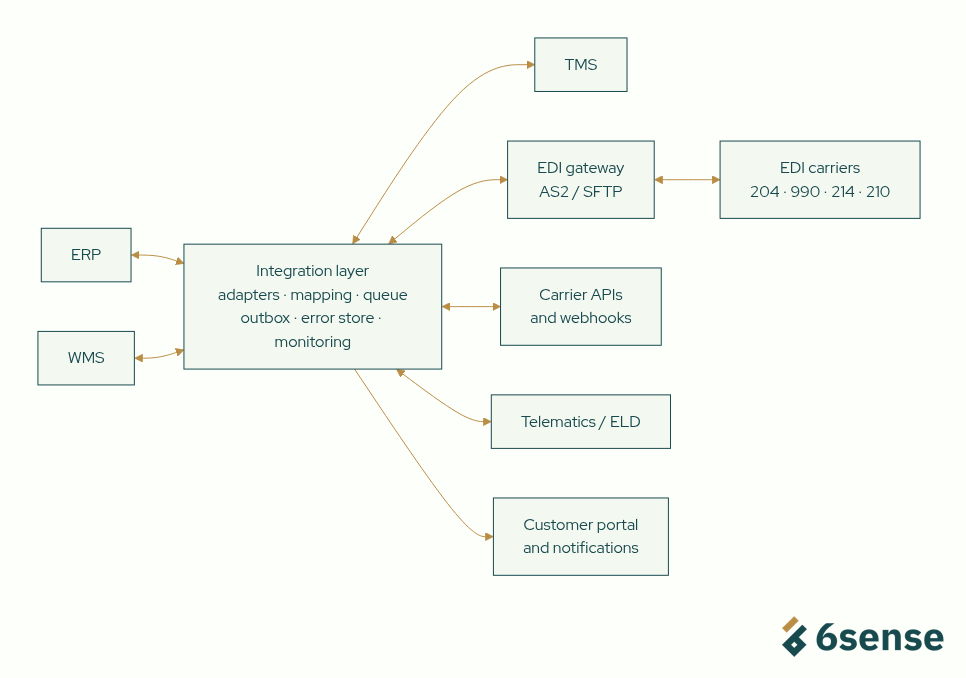
The layer has six components:
| Component | What it does |
| Adapters | One per system or partner; handle that system's transport, authentication, and format |
| Canonical model | Your internal definition of a shipment, stop, status, and charge, so adapters map to one model instead of to each other |
| Message queue | Buffers events so a slow or offline system doesn't block the others |
| Transactional outbox | Ensures an event is sent only if the database change that caused it committed |
| Error store | Holds failed messages with the reason, for review and replay |
| Monitoring | Tracks volumes, latency, acknowledgment rates, and failures per partner |
The transactional outbox pattern deserves attention. It solves a common TMS bug: a shipment saved in the database while the matching tender message never went out, or a message sent for a change that rolled back. The pattern writes outgoing messages to an outbox table in the same transaction, and a relay publishes them afterward.
Build, integrate, or extend: which approach fits?
There are four ways to get a TMS connected, and most companies use more than one. The right choice depends on how standard the connection is and how much it differs from what your TMS vendor already supports.
| Approach | What it means | Best when | Watch out for |
| Use native connectors | Turn on integrations your TMS vendor already provides | The partner and use case are standard and supported | Limited control over mapping and error handling |
| Use an EDI provider or iPaaS | Route messages through a managed EDI network or integration platform | Many trading partners using standard EDI | Per-partner or per-transaction fees; logic spread across tools |
| Build a custom integration layer | Engineer adapters, mapping, and monitoring you own | Non-standard partners, legacy systems, or business rules no product supports | Needs an owner to maintain it |
| Extend the TMS | Add custom modules or workflows inside the TMS | The gap is a missing TMS feature rather than a connection | Upgrade compatibility with the vendor's releases |
Custom engineering is most useful in a few specific situations:
- Partners whose EDI or APIs deviate from what your TMS connectors expect.
- Legacy ERPs or WMSs with no modern interface.
- Matching and reconciliation logic specific to your business, such as freight cost allocation by customer.
- A unified status and exception view across several carriers and systems.
- When the integration is part of a product you sell, such as a freight platform.
Native connectors and EDI providers should be the first choice wherever they fit. Building is for the gaps they leave.
What should a TMS integration implementation checklist include?

A TMS integration checklist should cover requirements, mapping, testing, and operations before any code ships. This is the sequence we recommend:
Requirements
- List every flow: source, destination, trigger, timing (real-time or batch), and owner.
- Define measurable outcomes, such as manual touches per load or time from delivery to invoice.
- Confirm each partner's method: API, EDI version, AS2 or SFTP, file format.
Data mapping
- Collect each partner's implementation guide or API documentation, plus real sample messages.
- Define your canonical model for shipments, stops, statuses, and charges.
- Build mapping tables for status codes, accessorial codes, units, and locations.
- Decide which system owns each field, and how reference IDs are stored and matched.
Build and test
- Make every receiver idempotent, and order status events by event time, not arrival time.
- Test with real partner samples, including edge cases: cancellations, reconsignments, partial deliveries, and duplicate messages.
- Run partner certification or test cycles before going live.
Operate and monitor
- Monitor per partner: message volume, acknowledgment rate, latency, and error count.
- Route failures to an error queue with an owner and a replay process.
- Keep a runbook: who to call at each partner, and the manual fallback if a feed stops.
- Pilot with one site, mode, or carrier group, then expand.
FreightWaves recommends a similar phased approach. It suggests starting with order creation, shipment execution, and freight settlement before adding advanced features.
What does this look like in practice?
The same integration problems appear in other operations-heavy systems 6sense HQ has built.
For ChargeOnSite, an EV charging operator, 6sense HQ built a charger-agnostic platform that supports 30+ charger models from different vendors. Each vendor interprets the OCPP protocol differently, which is the same problem as partner-specific EDI. We also connected Stripe payments to Zoho through automated API flows, the same kind of financial integration a TMS needs for freight settlement.
For Pattern50, a US startup studio, we mapped how files, contracts, hours, and billing actually moved, then built system connectors that keep those sources synchronized behind one live view. That is the same discovery work a TMS integration starts with.
When should you hire an engineering partner for TMS integration?
Hire an engineering partner when the integration work is beyond what your TMS vendor's connectors cover and beyond what your team has capacity to own. If your vendor and an EDI provider can handle everything, you don't need one.
Consider outside help when:
- You have a backlog of partners to onboard and each one takes weeks of your team's time.
- A legacy system blocks you, and nobody on staff knows its data model.
- Failures surface through customers or carriers rather than through your own monitoring.
- The integration is a product feature, such as a freight booking platform or customer visibility portal.
Questions to ask any partner:
- Who owns the code, the mappings, and the integration data afterward?
- How will failures be detected, routed, and replayed?
- Will you work with our existing TMS and connectors, or replace them?
- Who maintains partner changes after go-live?
When you shouldn't work with 6sense HQ: if your TMS vendor's native connectors or an EDI provider cover your partners, use them and skip us. We also won't recommend replacing a TMS that works. Our work is the integration layer around it: adapters, mapping, monitoring, and the business logic your products don't cover. We start by scoping one flow or one partner group, not a rebuild.
The bottom line
TMS integration connects your transportation management system to the ERP, WMS, carriers, and telematics feeds that a shipment touches. It typically uses carrier EDI such as the 204, 990, 214, and 210, alongside APIs and webhooks. The connections are rarely the hard part. Reference IDs, status mapping, partner-specific formats, duplicates, and master data are. An integration layer with adapters, a canonical model, idempotent receivers, an error queue, and per-partner monitoring keeps it reliable as partners grow.
About the author: AKM Ahsan is CTO of 6sense HQ, a software engineering partner for energy, mobility, and operations-heavy companies. 6sense HQ has built multi-vendor integration platforms such as ChargeOnSite's charger-agnostic EV charging software. LinkedIn
Need help integrating your TMS?
Bring us the systems and partners involved. In a 30-minute technical review, a senior engineer will look at your current setup and give you a straight read on what to connect first, whether or not you work with us. See our approach to logistics software development.